


A free UTM builder generates GA4-ready campaign tracking URLs in seconds. Paste your destination URL, fill in source, medium, and campaign — the tool builds the tagged link as you type. No account required. ToolStack's UTM builder is free, instant, and works for every channel.
Executive Summary
- 1.Only 17% of marketing teams apply UTM parameters consistently — meaning 83% are making attribution decisions on incomplete data (HubSpot, 2024).
- 2.Untagged email campaigns inflate GA4's Direct traffic by 20–40%, hiding your email ROI entirely (Litmus, 2023).
- 3.ToolStack's free UTM builder generates validated, GA4-ready tracking links in real time — no login, no paywall, 6 channel presets built in.
- 4.This guide includes copy-paste templates for email, Google Ads, Facebook, and LinkedIn — plus a 7-day UTM action plan to fix your attribution from scratch.
🎙 Listen to this article
Fixing GA4 Attribution with Tracking Links — NotebookLM Audio Overview
Advertisement Space
If you've ever searched for "GA4 campaign URL builder UTM parameters" and ended up on a Google support page that sent you in circles, you're not alone. Google's own Campaign URL Builder is buried, requires navigation across multiple help docs, and gives you no live preview of the URL you're building.
This guide shows you exactly how to build clean UTM tracking links for GA4 in under 10 seconds — using a free UTM builder that requires no account and works instantly in your browser.
UTM Tracking by the Numbers
The data is clear: most marketing teams are operating with broken attribution. Here's how bad it actually is.
64%
of marketers say campaign attribution is their #1 analytics challenge
— Ruler Analytics, 2024
17%
of marketing teams apply UTM parameters consistently across all campaigns
— HubSpot State of Marketing, 2024
20–40%
inflation in GA4 Direct traffic when email links are missing UTM tags
— Litmus Email Analytics Report, 2023
55%
of all unattributed GA4 conversions originate from untagged email links
— Klaviyo Deliverability Report, 2024
3.2×
better ROI reporting accuracy for brands using consistent UTM naming conventions
— Merkle Performance Marketing Report, 2023
76%
of marketing teams found attribution errors after auditing their UTM setup
— Databox Marketing Analytics Survey, 2023
23%
of paid ad spend is wasted due to untagged or incorrectly tagged destination URLs
— WordStream Paid Ads Benchmark Report, 2024
July 2024
Universal Analytics was fully sunset — all teams forced to rebuild UTM conventions for GA4
— Google Analytics, 2024
47
active campaign URLs managed by the average marketing team at any given time
— CoSchedule Marketing Management Report, 2024
$14.6B
estimated annual cost of misattributed marketing spend globally
— Nielsen Annual Marketing Report, 2023
Why GA4 Users Need a UTM Builder
GA4 processes UTM parameters automatically — but only if they're formatted correctly. A single mistake (a capital letter, an extra space, a missing &) and your traffic shows up as "direct" or gets split across multiple sources, making your attribution data meaningless.
GA4 also deprecated several automatic traffic-source groupings from Universal Analytics. In practice, this means more campaigns that previously got attributed correctly now need explicit UTM tagging to show up in the right channel groups. If you're not tagging every external link, you're flying blind.
The Attribution Black Hole — why untagged campaigns vanish in GA4
What the Experts Say
"If you don't tag it, you can't measure it. UTM parameters are the single most important habit a digital marketer can develop — they're the difference between guessing and knowing."
Avinash Kaushik
Digital Marketing Evangelist, Google
"Most marketers treat UTMs as an afterthought. They're not — they're the foundation of every ROI conversation you'll ever have with a client or a CFO."
Neil Patel
Co-founder, NP Digital
"I've audited hundreds of GA4 accounts. In almost every case, Direct traffic is 30–40% larger than it should be because email and social links aren't tagged. It's the most expensive avoidable mistake in digital analytics."
Annie Cushing
Data Analyst & Founder, Annielytics
Build your UTM links now — free, no signup
Paste your URL, fill in the fields, copy your tracking link. GA4-compatible, works for email, ads, and social.
Open Free UTM Builder →Case Study: How One SaaS Team Cut "Direct" Traffic by 38%
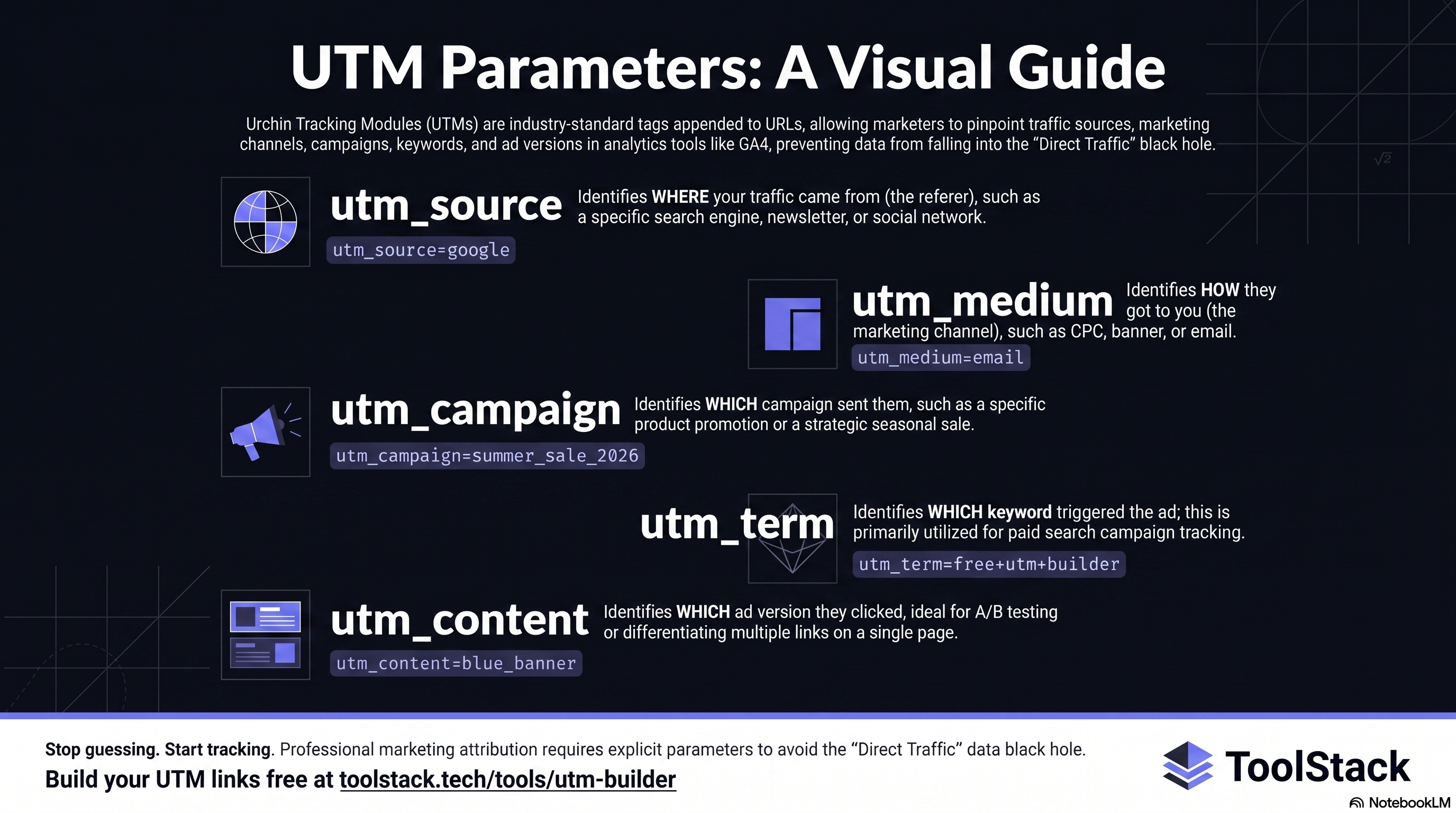
The 5 UTM Parameters GA4 Reads
GA4 supports five standard UTM parameters. The first two are required; the rest are optional but highly recommended.
| Parameter | What it tells GA4 | Required? |
|---|---|---|
| utm_source | Where the traffic came from (google, newsletter, facebook) | Yes |
| utm_medium | The channel type (cpc, email, social, organic) | Yes |
| utm_campaign | Which campaign sent the traffic (spring-sale-2026) | Recommended |
| utm_content | Which ad or link variation was clicked (header-cta) | Optional |
| utm_term | Which paid keyword triggered the ad (free+utm+builder) | Optional |
ToolStack vs Google vs utm.io: Which UTM Builder is Best?
Three of the most widely used free UTM builders — here's how they compare on the features that actually matter.
| Feature | ToolStack | Google Builder | utm.io |
|---|---|---|---|
| Real-time URL preview | ✅ As you type | ❌ Manual build | ✅ As you type |
| Requires login / account | ❌ No account needed | ✅ Google account | ✅ Account required |
| Quick-start channel presets | ✅ 6 presets built-in | ❌ None | ⚠️ Paid plans only |
| GA4 native compatibility | ✅ Full | ✅ Full | ✅ Full |
| URL format validation | ✅ Built-in | ❌ None | ✅ Built-in |
| Campaign history | ✅ Local storage | ❌ None | ✅ Cloud (paid) |
| Copy in one click | ✅ | ✅ | ✅ |
| Mobile-friendly | ✅ Fully responsive | ⚠️ Partial | ✅ |
| Bulk link generation | ❌ | ❌ | ✅ Paid |
| Price | Free — always | Free | Free / $29/mo |
Find Your UTM Convention in 10 Seconds
Select your primary channel and get the exact UTM naming convention you should be using — plus the most common mistake to avoid.
UTM Plan Recommender
What's your primary marketing channel?
Ready-to-Use UTM Templates for Every Channel
Copy these templates into the free UTM builder, swap in your URL and campaign name, and you're done.
Email Newsletters (AWeber, Mailchimp, Kit)
If you're sending campaigns through AWeber or any other email platform, every link in your broadcast should be tagged. Without UTMs, email traffic shows up as "direct" in GA4 — which means you can't measure your email ROI at all.
https://yoursite.com/landing-page
?utm_source=aweber
&utm_medium=email
&utm_campaign=may-newsletter-2026
&utm_content=header-cta
If your email has multiple links (header button, body link, footer CTA), use a different utm_content value for each. This tells GA4 exactly which placement drove the click — essential data if you're A/B testing email layouts.
Google Ads
Google Ads auto-tags with gclid, but manually adding UTMs gives you cleaner reports in GA4 and lets you compare Google traffic side-by-side with other paid channels.
https://yoursite.com/landing-page
?utm_source=google
&utm_medium=cpc
&utm_campaign=brand-search-may26
&utm_term=free+utm+builder
&utm_content=headline-v1
Facebook & Meta Ads
https://yoursite.com/landing-page
?utm_source=facebook
&utm_medium=paid-social
&utm_campaign=may-promo-2026
&utm_content=carousel-blue
LinkedIn Ads & Organic Posts
# Paid LinkedIn ad
?utm_source=linkedin&utm_medium=paid-social&utm_campaign=b2b-lead-gen-may26

# Organic LinkedIn post
?utm_source=linkedin&utm_medium=social&utm_campaign=product-launch
Pros & Cons of UTM Parameter Tracking
The 4 UTM Rules That Prevent Bad Data
- → Always use lowercaseGA4 is case-sensitive. "Facebook" and "facebook" appear as two separate sources. Lowercase everything, always.
- → Never use spacesSpaces in UTM values break URLs or get encoded as %20. Use hyphens: spring-sale, not spring sale.
- → Never tag internal linksAdding UTMs to links that go from one page of your site to another overwrites the original source. GA4 will think the referral came from your own site. Only tag external links pointing inward.
- → Be consistent across your teamIf one person uses utm_source=newsletter and another uses utm_source=email-list, GA4 splits the data. Document your naming convention and enforce it.
How to Build UTM Links Without Errors
Manually typing UTM strings into URLs is error-prone. A misplaced &, a capital letter, or an unencoded space breaks tracking silently — GA4 just drops the parameter and attributes the session incorrectly.
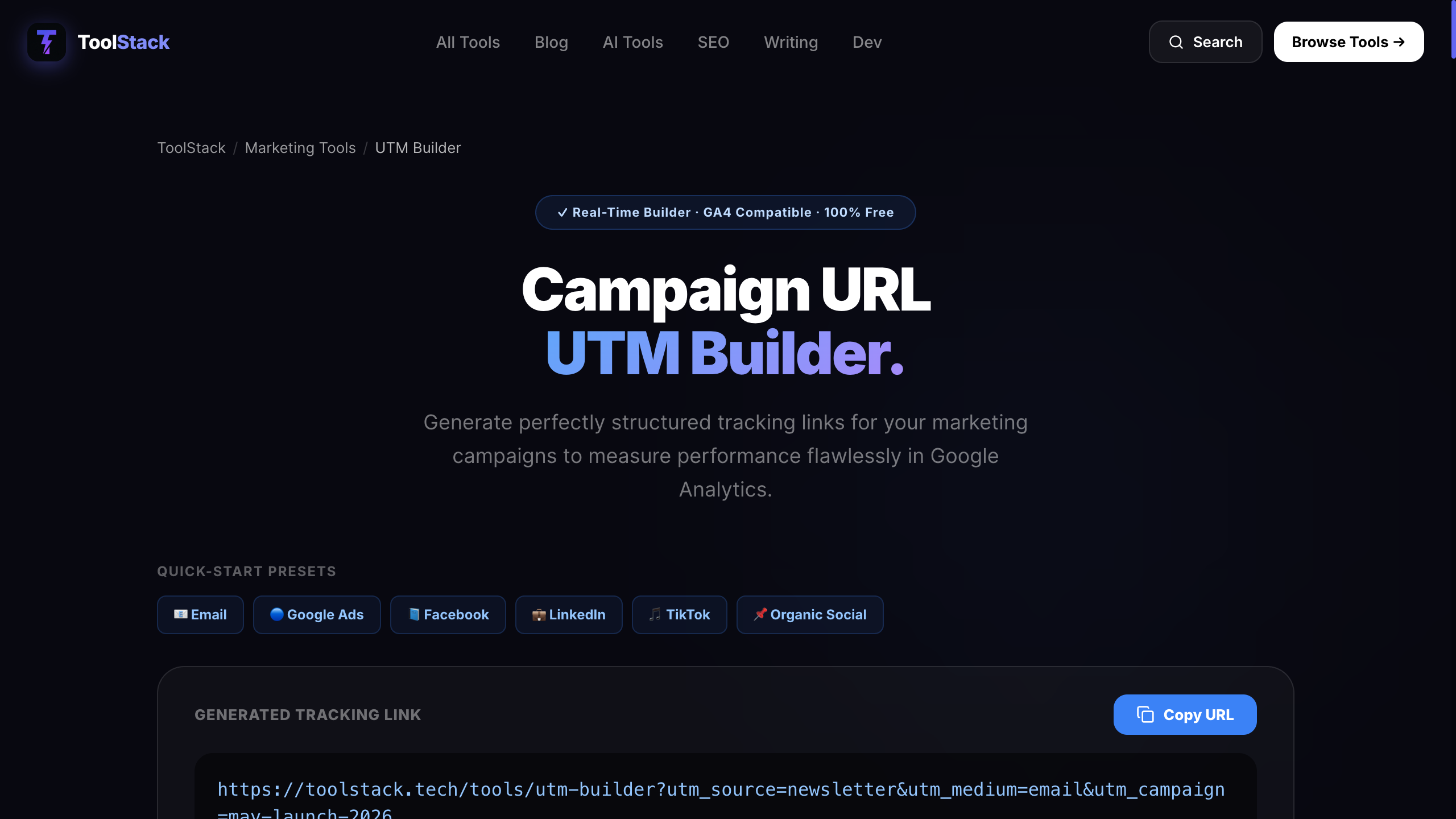
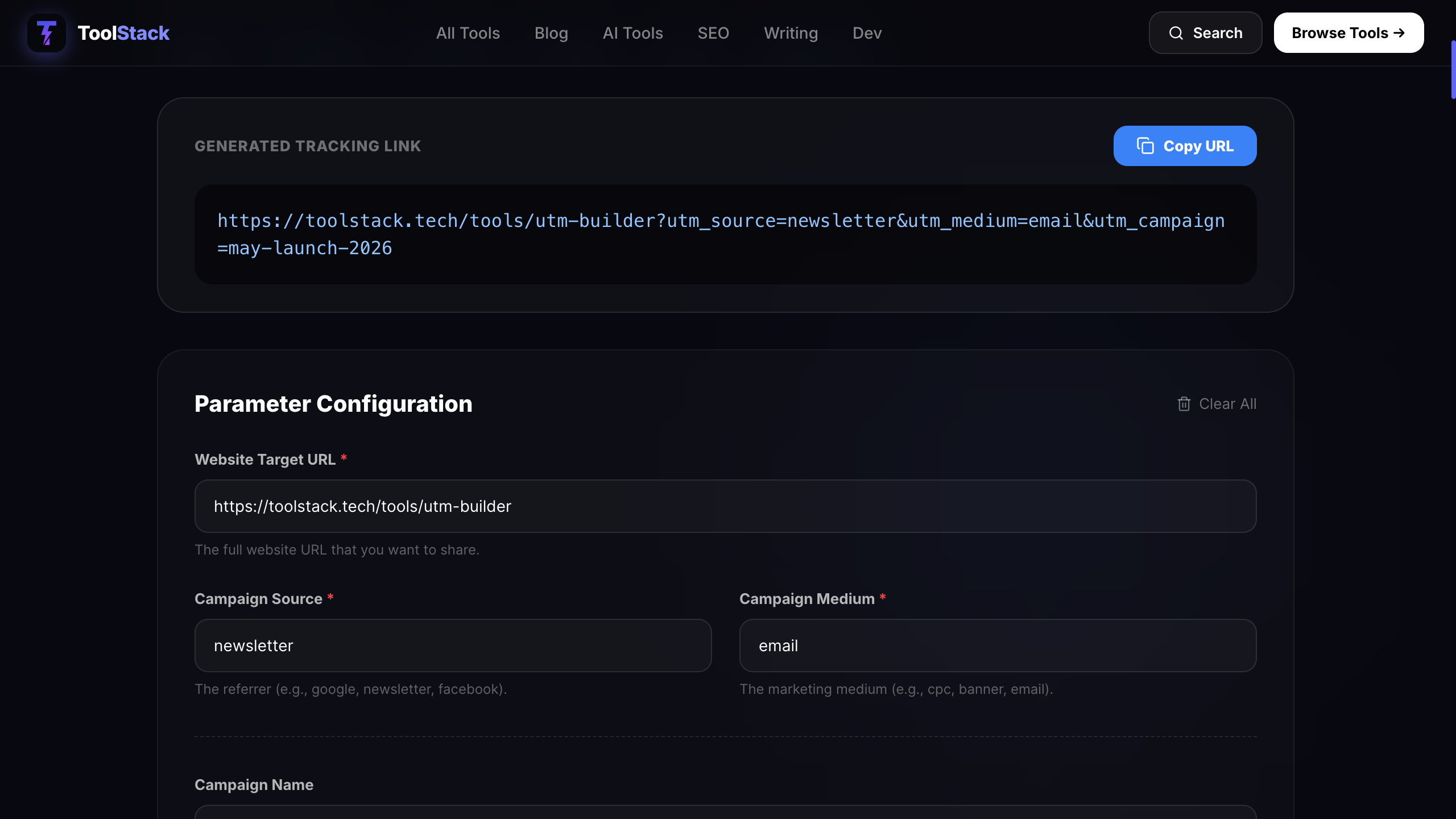
ToolStack's free UTM builder validates your base URL, encodes special characters automatically, and shows the finished tracking link as you type. There's nothing to install, no account required, and it works with GA4 out of the box.
If you're running AI-powered ad campaigns, AdvertsGPT pairs well with this workflow — generate your ad copy there, then tag every destination URL here before publishing.
7-Day UTM Action Plan: Fix Your Attribution from Scratch
If your GA4 Direct traffic is over 20%, follow this plan. One task per day — by day 7 your attribution will be clean.
Audit your GA4 — go to Reports → Acquisition → Traffic Acquisition. Note your Direct % and screenshot it as your baseline.
~20 min
Write your UTM naming convention doc. Decide your source/medium values for every channel and share it with the team.
~30 min
Tag all active email links. Every link in your next broadcast gets a UTM tag using the free builder.
~20 min
Update all social bio links and pinned post links with proper UTMs. Instagram, LinkedIn, TikTok, X.
~15 min
Add UTMs to all paid ad destination URLs — Google Ads, Meta, LinkedIn Ads. Don't skip utm_content.
~30 min
Build a shared UTM tracking spreadsheet for your team. Columns: URL, Source, Medium, Campaign, Date, Owner.
~20 min
Check GA4 DebugView while clicking your new tagged links. Verify they're showing up in Traffic Acquisition with correct source/medium.
~15 min
The Future of UTM Tracking: What's Coming
Google is expected to expand GA4's automatic campaign detection for Google-owned channels, reducing some manual UTM requirements for Search and YouTube — but cross-channel attribution will still require manual tagging for Facebook, email, and LinkedIn.
AI-powered marketing platforms will begin auto-generating UTM parameters based on campaign metadata. Expect tools like Meta Ads and LinkedIn Campaign Manager to offer 'UTM sync' features that push tags directly to GA4 — but the five-parameter standard isn't going anywhere.
As third-party cookies phase out globally, UTM parameters will carry increasing importance as a first-party attribution signal. Marketers who build clean UTM habits now will have a major advantage as consent-based tracking becomes the default.
Stop guessing where your traffic comes from.
Tag every campaign link in under 10 seconds. Free, no signup, GA4-ready.
Build Your UTM Link Free →Frequently Asked Questions
What is the best free UTM builder online?
ToolStack's free UTM builder at toolstack.tech/tools/utm-builder generates perfectly formatted GA4-compatible tracking URLs in real time. No signup, no install, no paywall. Fill in your fields, copy the URL, done.
Is this UTM builder compatible with GA4?
Yes. GA4 reads all five standard UTM parameters — utm_source, utm_medium, utm_campaign, utm_term, and utm_content — automatically with no extra configuration. The links this builder generates work natively with GA4.
What's the difference between Google's Campaign URL Builder and this one?
Google's own Campaign URL Builder requires navigating to a separate support page and offers no real-time preview or field guidance. ToolStack's UTM builder shows the finished URL as you type, validates your base URL, and lets you copy it in one click. It's faster and requires no Google account.
Do UTM parameters hurt SEO?
No, as long as your pages have a canonical tag pointing to the clean URL. UTM parameters are stripped by analytics tools before processing and are not used by Google for ranking. Never add UTM parameters to internal links — only to links pointing from external sources to your site.
Should I use hyphens or underscores in UTM values?
Hyphens are preferred: utm_campaign=spring-sale rather than spring_sale. More importantly, always use lowercase and never use spaces. GA4 treats 'Facebook' and 'facebook' as two separate traffic sources — inconsistent casing silently splits your data.
Can I use this UTM builder for AWeber email campaigns?
Yes — and you should. Every link inside an AWeber broadcast should have utm_source=aweber, utm_medium=email, and a campaign name matching the send. If your email has multiple CTAs, use utm_content=header-cta, utm_content=body-link, etc. to see which placement drove clicks.
How do I check if my UTM tags are working in GA4?
Go to GA4 → Reports → Acquisition → Traffic Acquisition. Set the primary dimension to 'Session source / medium'. If your tagged links are firing correctly, you'll see your utm_source and utm_medium values appear within 24–48 hours. For real-time confirmation, use GA4's DebugView while clicking a tagged link.