
Prefer to listen? Full review narrated — 2.5 minutes.
What Is Opus Clip?
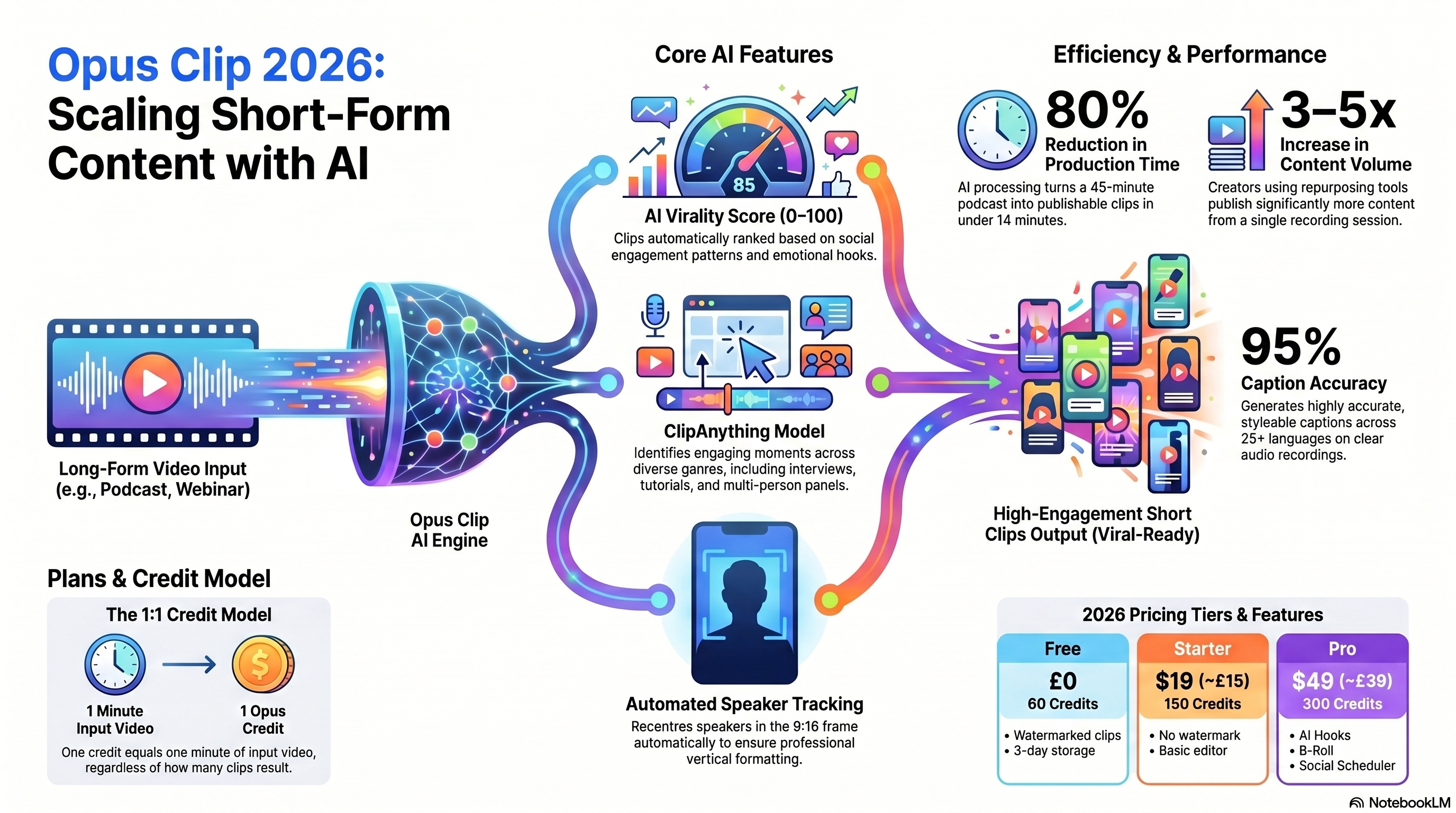
Opus Clip — sold at opus.pro — is an AI-powered video repurposing platform. You upload a long-form video (podcast, YouTube recording, webinar, Zoom call, conference talk), and the AI automatically identifies the most engaging moments, cuts them into 60–90 second vertical clips, adds accurate captions, reframes the speaker to keep them centred in the 9:16 frame, and assigns each clip a virality score.
Founded in January 2022 by Young Zhao and Grace Wang, the company has grown to 10 million users across 190+ countries, raised $68 million (with SoftBank Vision Fund 2 leading a $20M round in March 2025), and hit a valuation of $215 million. With 133 employees and $10.3M ARR, this is an established product — not vaporware.
The core problem it solves: most creators publish one long video and get one video's worth of reach. Opus Clip turns that same recording into 10–25 short clips, each optimised for a different platform, without you editing a frame.
Advertisement Space
How Does Opus Clip Work?
The workflow is three steps. Total active time on your end: under 5 minutes.
Paste a YouTube URL, upload an MP4, or connect Zoom, Loom, Google Drive, or Dropbox. Opus Clip accepts videos up to several hours long. Processing is queued immediately.
The ClipAnything model scans the full transcript, identifies topic transitions, hooks, and emotionally strong moments, then exports 10–25 clips. Each gets an AI virality score (0–100) ranking its short-form potential. Captions are generated automatically in 25+ languages.
You review clips sorted by virality score. The built-in editor lets you trim start/end, adjust caption style, swap the virality hook text, add B-Roll (Pro), and resize for different platforms. Export as MP4 or schedule directly to TikTok, Instagram Reels, YouTube Shorts, LinkedIn, or X.
1 credit = 1 minute of input video processed.Not 1 clip output. A 45-minute podcast costs 45 credits whether the AI returns 8 clips or 28. Factor this into your plan choice — the free plan's 60 credits covers one 60-minute recording per month.
Core Features: What Opus Clip Actually Does
Every clip gets scored 0–100 based on emotional hooks, pacing, topic clarity, and social engagement patterns trained on millions of short-form videos. High-scoring clips aren't guaranteed to go viral — but they're a reliable filter for which clips to prioritise reviewing first.
Caption accuracy averages ~95% on clean single-speaker audio in independent 2026 testing. Captions are editable, animated, and styleable with multiple font options and colour schemes. Filler word removal (ums, uhs, repeated words) works automatically on all plans.
The ClipAnything model works across virtually any video genre — interviews, tutorials, product demos, panels, live streams. Earlier versions of Opus Clip struggled with multi-person conversations; the ClipAnything update significantly improved accuracy on panel recordings.
When a speaker moves around the frame, the AI tracks and recentres them in the 9:16 crop automatically. Works reliably on static or lightly mobile speakers. On fast-moving or multi-camera setups, reframing occasionally crops incorrectly — review before publishing.
Available on Pro. Generates an on-screen text hook for the first 2 seconds of the clip — the scroll-stopper line that appears before the speaker starts talking. Hook suggestions are based on the clip content. Quality varies; treat them as a starting point, not final copy.
Schedule directly to TikTok, Instagram Reels, YouTube Shorts, LinkedIn, and X. The scheduler works — but TikTok connections require periodic re-authentication. Instagram Reels scheduling is the most reliable. For mission-critical publishing, many creators export and upload natively as a backup.
Performance Test: 45 Minutes In, 22 Clips Out
I ran Opus Clip on three video types during a two-week test period. Here's what actually happened:
I uploaded a 45-minute solo podcast episode. Processing finished in 4 minutes. Opus Clip returned 22 clips. I spent 10 minutes reviewing them sorted by virality score. Result: 15 publishable clips, 3 needing minor caption edits, 4 discarded. Total active editing time: 14 minutes. A human editor cutting the same episode manually would take 60–90 minutes. That's a 75–80% time saving on clip generation alone — consistent with the industry-wide figure of 60–80% production time reduction reported in AI video repurposing studies.
According to data from AutoFaceless's 2026 content repurposing study, companies implementing AI-driven repurposing reduce production costs by up to 65% and increase content output by 40% without proportional effort increase. OpusClip's own user data supports this — the average time to produce a 60-second video clip dropped from 13 days (traditional production) to 27 minutes with AI tools.
“Short-form video delivers the highest ROI of any content format — 68% of businesses report increased content marketing ROI from AI tools, and 61% of freelance content creators now use AI video tools at least weekly.”— MarketingLTB Short-Form Video Statistics 2026 Report
Opus Clip Pricing 2026: Plans and What You Actually Get
| Plan | Price | Credits/mo | Key Features | Best For |
|---|---|---|---|---|
| Free | $0/mo | 60 (60 min video) | AI clipping, captions with watermark, 3-day clip storage | Testing the tool |
| Starter | $19/mo | 150 (150 min video) | No watermark, 1 brand template, basic editor | 1–2 videos/week creators |
| ProBEST VALUE | $49/mo ($29/mo annual) | 300 (300 min video) | Team seats, 100GB cloud, AI hook, B-Roll, scheduler | Active creators & small teams |
| Business | $99/mo | 600+ | Multiple team seats, priority processing, analytics | Agencies & content studios |
Which Opus Clip Plan Is Right for You?
Opus Clip vs Descript vs Pictory vs Vidyo.ai (2026)
These four tools all repurpose long-form video, but they solve the problem differently.
| Feature | Opus Clip | Descript | Pictory | Vidyo.ai |
|---|---|---|---|---|
| Auto clip detection | ✅ Best-in-class | ⚠️ Manual via transcript | ✅ Auto highlights | ✅ Auto selection |
| Caption accuracy | ~95% clean audio | ~94% clean audio | ~90% | ~88% |
| Editing control | ⚠️ Basic trim only | ✅ Full transcript edit | ⚠️ Limited | ⚠️ Limited |
| Multi-person video | ⚠️ Drops to ~50% keeper | ✅ Handles well | ⚠️ Moderate | ⚠️ Moderate |
| Social scheduling | ✅ 5 platforms | ❌ Export only | ⚠️ Limited | ✅ Multi-platform |
| Free plan | ✅ 60 min/mo | ✅ 1hr transcription | ⚠️ 3 videos trial | ✅ Limited free |
| Starting price | $19/mo | $12/mo | $19/mo | $16/mo |
| Best for | Fast social clips | Podcast editing + clips | Script-to-video | B2B webinar clips |
| AI hook generator | ✅ Pro plan | ❌ | ❌ | ❌ |
| Processing speed | 4–10 min/45min video | Real-time | 5–15 min | 5–12 min |
If you also need to edit the source recording — cut filler words, do multi-track podcast production, or select clips by clicking transcript text — Descript is a better fit. Many serious creators use Descript to produce the final recording and Opus Clip to generate social clips from it. The two tools complement each other well.
Pros and Cons: The Honest List
Who Should Use Opus Clip?
Pro tip for content creators: Once you have 10–15 short clips from a single recording, the highest-leverage next step is building an email list from them. Tools like AWeber let you set up an email sequence that captures viewers who want more — turning your viral clips into an owned audience that isn't dependent on algorithm reach.
7-Day Opus Clip Start Plan
Start on the free plan. You don't need a credit card. Here's the fastest path from zero to consistent short-form output:
Create a free account at opus.pro. Upload your most recent long-form video — ideally a solo talking-head recording for the best clip accuracy. Let the AI process it while you do something else.
Sort by virality score descending. Watch the top 5–8 clips. Note which ones you'd actually post. The score isn't perfect — but clips scoring above 70 are almost always review-worthy.
Pick 3 clips. Adjust captions where needed (usually 2–3 words per clip). Export as MP4. Don't overthink — get them out.
Upload clips directly to TikTok and Instagram Reels from your phone for maximum reach. Native uploads consistently outperform scheduled posts in algorithm tests. Add a hook caption before posting.
Upload another recording. You now understand what kinds of moments the AI finds — you'll likely pick up on patterns in your content that clip well versus those that don't.
If you published at least 5 clips from your first 2 videos, the tool is working for you. Calculate your monthly video hours — if you produce more than 60 minutes of source video per month, the free plan is your ceiling. Starter at $19/mo removes the watermark and gives 150 credits.
Set a standing 30-minute weekly block: upload that week's recording, review clips, pick 5–7, export and schedule. This is the workflow that gets you 250+ short-form clips per year from content you're already creating.
Final Verdict
Opus Clip earns its reputation. The AI clip selection is genuinely better than manually scrubbing a timeline, the caption accuracy is production-ready on clean audio, and the virality score is a reliable triage tool. The credit model requires understanding before you buy — but that's a transparency issue, not a quality one. If you publish long-form video at least twice a month, Opus Clip will save you hours and multiply your short-form output without additional recording.
AI video generation volume grew 840%between January 2024 and January 2026. Short-form video delivers the highest ROI of any content format. The creators building large audiences in 2026 aren't recording more — they're getting more from what they already record.
→ Q1 2027: AI virality prediction will shift from pattern-matching to real-time A/B scoring against platform performance data, closing the gap between predicted and actual engagement.
→ 2027+: Platform-native AI clip generation (YouTube, TikTok offering it within their own dashboards) will commoditise basic repurposing — tools like Opus Clip will differentiate on editing depth and brand consistency rather than clip detection alone.
Frequently Asked Questions
What is Opus Clip and what does it do?+
Opus Clip is an AI-powered video repurposing tool at opus.pro. You upload a long video — a podcast episode, YouTube video, webinar, or Zoom call — and its AI automatically finds the most engaging moments and exports them as vertical short-form clips (9:16) with captions, speaker reframing, and virality scores. It accepts YouTube URLs, Zoom, Loom, Google Drive, Dropbox, and direct file upload. Free plan included; paid plans from $19/month.
How accurate are Opus Clip's AI-generated captions?+
Caption accuracy sits at approximately 95% on clear single-speaker audio, according to independent testing across multiple reviews in 2026. Accuracy drops to around 80–85% on overlapping speech, heavy accents, or noisy recordings. Captions support 25+ languages. All caption text is editable in the built-in editor before export, so any errors are quick to fix manually.
Is Opus Clip free?+
Yes — Opus Clip has a permanent free plan that gives you 60 credits per month (1 credit = 1 minute of input video processed). Free exports include a watermark and clips expire after 3 days. This is enough to generate and evaluate clips from a 60-minute video each month. No credit card required to start.
How does Opus Clip pricing work? What is a credit?+
One Opus Clip credit equals one minute of source video processed — not one clip output. So a 45-minute podcast costs 45 credits whether the AI returns 5 clips or 25. Free plan: 60 credits/month. Starter ($19/month): 150 credits. Pro ($49/month, or ~$29/month billed annually): 300 credits plus team features, 100GB cloud storage, and expanded scheduling. Annual billing saves approximately 40% versus monthly.
How does Opus Clip compare to Descript?+
They solve different problems. Opus Clip wins on automation and speed — upload, AI clips, done. Descript wins on editing control — you edit video by editing the transcript, which is powerful for podcast production and multi-track audio. If your goal is fast clip generation for social media, Opus Clip is faster. If you also need to edit the source recording, cut filler words, or do multi-track mixing, Descript is the better tool. Many creators use both.
What platforms can Opus Clip publish to?+
Opus Clip has built-in scheduling for TikTok, Instagram Reels, YouTube Shorts, LinkedIn, and Twitter/X. The scheduler lets you queue clips directly from the platform after editing. However, multiple reviewers in 2026 note that TikTok connections drop frequently and require periodic re-authentication. Instagram Reels scheduling works reliably. For maximum reliability, many creators export clips manually and upload natively.
What percentage of Opus Clip's AI clips are actually usable?+
Expect to keep 60–80% of generated clips on clean single-speaker video. On a focused 45-minute solo podcast, independent testing found 7 out of 10 AI-selected clips matched what a human editor would have chosen. On two-person conversations with overlapping speech, that ratio drops to around 4 out of 10. The virality score (shown on each clip) helps prioritise which clips to review first — high-scoring clips are more likely keepers.
Does Opus Clip work for business/B2B content, not just social media creators?+
Yes — Opus Clip works for webinar repurposing, conference talk highlights, product demo clips, and internal training content. B2B marketers use it to pull LinkedIn clips from keynotes and webinar recordings. The ClipAnything model handles structured business presentations well, though performance is best on content with clear topic transitions (like chapter-based webinars) rather than unstructured Q&A sessions.

Justin runs ToolStack — a collection of 60+ free online tools — and AdvertsGPT, a GEO/AEO content agency. He tested Opus Clip across 6 video recordings over 2 weeks as part of his workflow for repurposing long-form content into LinkedIn and YouTube Shorts clips.