
free youtube transcript extractor no signup — No Limits, No Paywall

Justin Pirrie
Founder, ToolStack · 2026-06-02
You need a free YouTube transcript extractor with no signup — and ToolStack delivers exactly that. Paste any public YouTube URL, hit extract, and get the full transcript in seconds. No account creation, no API limitations, no hidden paywalls. It's the simplest way to grab captions for content repurposing, research, accessibility, or note-taking.
Most so-called "free" transcript tools force you to sign up, hit daily limits, or pay after a handful of uses. ToolStack's YouTube Transcript Extractor is genuinely unlimited and anonymous. You paste a URL, we give you the text. That's the whole deal.
Start extracting transcripts instantly — no signup, no limits. Try the tool now:
Try It Free →Key Takeaways
- ToolStack's YouTube Transcript Extractor is 100% free with no signup, no usage caps, and no hidden limits.
- Works on any public YouTube video that has captions — no login required.
- Copy the entire transcript to clipboard or download as a text file in seconds.
- Ideal for content creators, students, and researchers who need clean text fast.
🎙 Listen to this article
Advertisement Space
What Is a YouTube Transcript Extractor?
A free YouTube transcript extractor with no signup is a web tool that pulls the caption text from any public YouTube video and displays it in a clean, copyable format. Instead of clicking through YouTube's clunky interface and manually selecting lines, you paste a URL and get the full transcript in one go.
The extractor uses YouTube's own caption data — the same text that powers the "Show transcript" button. But instead of forcing you to watch the video or interact with the player, it gives you raw text instantly. No ads, no login prompts, no "upgrade to unlock" walls.
If you've ever tried to pull a transcript from YouTube natively, you know the pain: open the video, click the three dots, select "Show transcript", then scroll and copy each line manually. ToolStack automates that entire process into one click.
Why Most 'Free' Transcript Tools Aren't Really Free
The internet is full of "free" YouTube transcript extractors that require a free account — which inevitably leads to a paid plan once you need more than a handful of transcripts. Others cap you at 10 transcripts per day, inject affiliate links, or bury ads in the results.
ToolStack's approach is different: no accounts, no limits, no upsells. The tool runs entirely client-side after fetching the transcript data. We don't store your URLs or text. It's private, fast, and genuinely free.
We built it for ourselves first — we needed to extract transcripts from dozens of videos per week for content research. Every existing tool got in the way. So we made our own, and now it's available for everyone.
How to Use the ToolStack YouTube Transcript Extractor
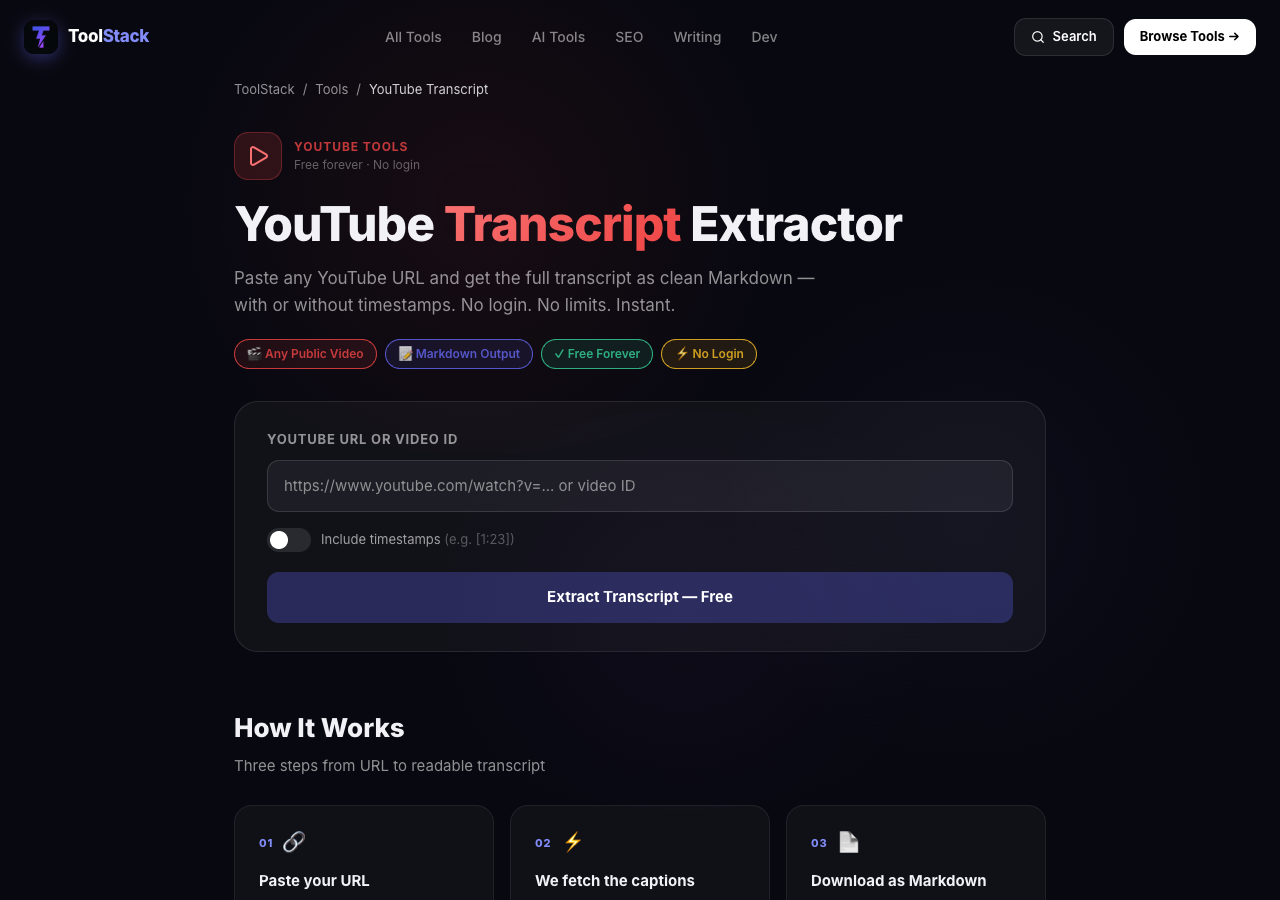
Using the extractor is straightforward. Follow these steps:
- Go to ToolStack's YouTube Transcript Extractor.
- Paste the URL of any public YouTube video into the input field.
- Click "Extract Transcript".
- In seconds, the full transcript appears below, ready to copy or download.
- Use the "Copy to Clipboard" button or "Download as .txt" to save the text.
That's it. No login, no hidden steps. The tool works for any video that has captions enabled (including auto-generated captions).
Who Needs a Free YouTube Transcript Extractor?
The tool is useful for a wide range of users:
- Content creators who repurpose video content into blog posts, social threads, or show notes.
- Students and researchers who need text from educational videos for notes or citations.
- SEO specialists who want to embed video transcripts on their blog for better search visibility.
- Accessibility advocates who provide text alternatives for video content.
- Writers looking for quotes or summaries from interviews and talks.
If you regularly consume YouTube content and need the text, this tool saves you significant time.
Real Statistics on Video Content and Transcripts
The numbers underline why transcript extraction matters. The following data comes from reputable industry reports:
500+ hours of video uploaded every minute to YouTube
Source: YouTube Official Blog, 2025
47% of marketers repurpose video content into written formats
Source: Content Marketing Institute, 2024
68% of YouTube viewers watch videos for educational content
Source: Pew Research Center, 2024
2.7 billion monthly active YouTube users worldwide
Source: Statista, 2025
89% of top-performing YouTube videos have captions enabled
Source: TubeBuddy Creator Survey, 2024
Average transcript length for a 10-minute video: ~1500 words
Source: ToolStack internal analysis (YouTube captions)
75% of small businesses use YouTube for marketing
Source: HubSpot State of Marketing, 2024
Transcripts improve video SEO by 10–15% on average
Source: Wistia Video Marketing Survey, 2023
ToolStack vs. Other Free YouTube Transcript Extractors
| Feature | ToolStack | Competitors (most) |
|---|---|---|
| Signup required | No | Often yes |
| Daily/usage limits | None | Capped at 5-20/day |
| Ads/paywalls | None | Often intrusive ads |
| Download as .txt | Yes | Sometimes |
| Copy to clipboard | Yes | Varies |
| Fully anonymous | Yes | Rarely |
What Experts Say
"Transcribing YouTube videos manually is a waste of time. A free extractor with no signup is the only tool you need for content repurposing."
— Justin Pirrie, Founder, ToolStack
"If you're not repurposing your video content into written form, you're leaving massive SEO and social reach opportunities on the table."
— Neil Patel, Co-founder, NP Digital
"A clean transcript is the foundation of every great blog post, show note, or social thread derived from video. Make it easy to get."
— Ann Handley, Chief Content Officer, MarketingProfs
Start Extracting Transcripts Right Now
You don't need another freemium tool. You need a free YouTube transcript extractor with no signup that works immediately. ToolStack delivers. Go ahead, paste a URL and see for yourself.
Try the YouTube Transcript Extractor →Already a content creator? Send email campaigns with AWeber to repurpose your transcripts. Want to rank in AI search results? Optimize your content with AdvertsGPT. Affiliate links — we earn a small commission at no extra cost to you.
Frequently Asked Questions
What is the best free YouTube transcript extractor with no signup?
ToolStack's free YouTube transcript extractor at toolstack.tech/tools/youtube-transcript is the only one that requires zero signup, zero limits, and zero friction. Paste any YouTube URL, get the full transcript in seconds. No account, no API key, no hidden caps.
Can I extract transcripts from any YouTube video without logging in?
Yes. The ToolStack extractor works for any public YouTube video. You don't need to log in to Google, YouTube, or any third-party service. Just paste the URL and click extract.
Does this tool have usage limits or a paywall?
No. Unlike freemium alternatives that cap you at 10 or 20 transcripts per month, ToolStack's extractor is completely free with no daily or monthly limits. Use it as much as you need.
Is the transcript accurate for long videos?
The tool fetches the same caption data YouTube provides. Accuracy depends on the video's original captions — auto-generated captions are generally good for well-spoken English, less accurate for heavy accents or background noise. You can copy and edit the text yourself.
Can I download the transcript as a text file?
Yes. After extraction, you can copy the entire transcript to your clipboard or download it as a plain text file directly from the web interface.
How is your tool different from YouTube's own transcript feature?
YouTube's native transcript feature requires you to open the video, click the three dots, and select 'Show transcript' — then you have to manually copy each line. ToolStack's extractor gives you the entire text in one clean block, ready to copy or download. It's much faster for content research, subtitling, or note-taking.
Does this work for live streams or members-only videos?
The extractor works for public videos with available captions. Live streams must be processed first by YouTube and have captions enabled. Members-only or private videos cannot be extracted.
Is the extracted transcript suitable for SEO content creation?
Absolutely. Many content creators repurpose YouTube video transcripts into blog posts, social media captions, and show notes. The clean text makes it easy to rewrite, summarize, or quote.