

TL;DR
- Your Flesch Reading Ease score tells you how easy your writing is to understand — target 60–80 for most audiences.
- Readable writing converts better in email, ranks better on Google, and gets cited more by AI search engines.
- Check yours in seconds with the free ToolStack Word Counter — no signup, instant results.
Advertisement Space
Why Word Count Is Only Half the Story
Word count is the metric everyone checks. It's a checkbox — hit 1,500 words and move on. But the writers who actually convert readers, rank on page one, and get cited by ChatGPT are checking something different: how readable their writing is.
Readability is a measure of how easy your text is to understand. It factors in sentence length, syllable count, and paragraph structure — not just how many words you wrote. A 2,000-word article written at a university reading level will lose most readers by paragraph three. The same information written at a Year 9 level keeps them reading to the end.
The ToolStack Word Counter gives you both in one free tool — word count, character count, sentence count, and your Flesch Reading Ease score — instantly, with no account required.
What Your Flesch Score Actually Means
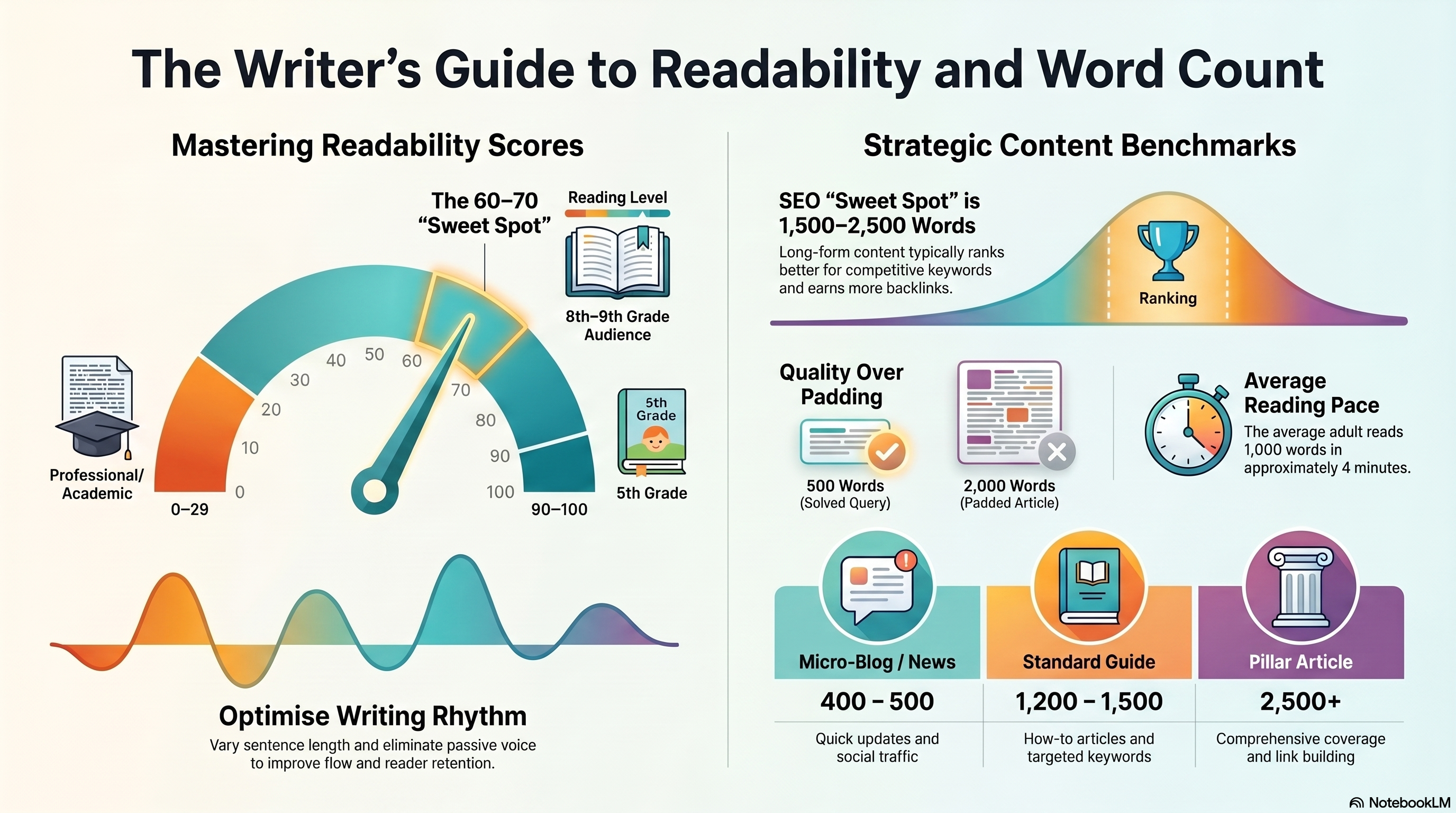
The Flesch Reading Ease scale runs from 0 to 100. The higher the number, the easier your writing is to read. Here's how to interpret your score:
| Score | Difficulty | Best For |
|---|---|---|
| 90–100 | Very Easy | Children's books, consumer apps |
| 70–90 | Easy | Consumer content, social media, email newsletters |
| 60–70 | Standard | Blog posts, landing pages, marketing copy |
| 50–60 | Fairly Difficult | Professional content, B2B articles |
| 30–50 | Difficult | Technical documentation, academic writing |
| 0–30 | Very Difficult | Legal documents, scientific papers |
Three Changes That Move Your Score Fast
If your score comes back below 60, these three edits will move it quickly:
Shorten your sentences
The biggest driver of a low score is long sentences. Aim for 15–20 words on average. When a sentence runs past 30 words, split it in two. The easiest way to spot them: read your text out loud. If you run out of breath, split the sentence.
Replace long words with short ones
Every word over three syllables drops your score. 'Utilise' → 'use'. 'Implement' → 'build'. 'Approximately' → 'about'. This isn't dumbing down — it's precision. The clearest writers in the world choose short words by default.
Break up your paragraphs
A wall of text lowers engagement before anyone even reads a word. Keep paragraphs to 3–4 sentences maximum for web content. White space isn't empty — it's breathing room that keeps readers moving.
Paste your text into the Word Counter, make one change, and paste again. Your score updates instantly so you can see exactly what's working.
Email Marketing
Readable Emails Get More Clicks
The same readability rules that improve your blog posts make your emails perform better. A Flesch score above 65 in your email campaigns means more people read to the CTA — and click it.
If you're building an email list (and you should be — it's the only audience you own), AWeber is the platform I recommend. It's been the go-to for content creators and small businesses for years — drag-and-drop email builder, automations, landing pages, and a free plan up to 500 subscribers. Write your emails, check the readability score here, then send.
Try AWeber Free →AI Search Visibility
Readable Content Ranks in AI Search Too
Google uses readability signals as part of its content quality assessment. But more importantly, AI search engines — ChatGPT, Perplexity, Gemini — preferentially cite content that is clearly structured and easy to extract. A high readability score means AI can parse your content and use it as a source.
To check whether your content is actually being found and cited by AI search engines, AdvertsGPT scores your site's AI visibility across 10 AI models in 60 seconds and shows you exactly where you're missing coverage.
Check Your AI Score Free →Frequently Asked Questions
What is a word count checker?
A word count checker is a tool that counts the total number of words, characters, sentences, and paragraphs in a piece of text. Advanced versions like the ToolStack Word Counter also calculate your Flesch Reading Ease score — a readability metric that tells you how easy or difficult your writing is to understand at a glance.
What is a good Flesch Reading Ease score?
A Flesch Reading Ease score between 60 and 70 is considered standard and suitable for most audiences — roughly equivalent to a Year 8–9 reading level. Scores above 70 are easier to read (plain English), while scores below 30 are very complex (academic or legal text). For blog posts, marketing copy, and emails, aim for 60–80. The higher the score, the more people can read and understand your content.
How does the Flesch Reading Ease score work?
The Flesch Reading Ease formula measures two things: average sentence length and average number of syllables per word. Shorter sentences and simpler words produce a higher (easier) score. The formula is: 206.835 minus (1.015 × average sentence length) minus (84.6 × average syllables per word). It was developed by Rudolf Flesch in 1948 and is still the most widely used readability metric in English writing.
Does word count affect SEO?
Word count alone does not directly determine rankings — Google does not have a minimum word count requirement. What matters is whether your content fully covers the topic. That said, most pages that rank on page one for competitive keywords tend to be comprehensive (1,000–2,500 words) because they answer more of what a searcher needs. Thin content (under 300 words) can be flagged by Google's quality systems if it doesn't fully satisfy the search intent.
Is the ToolStack Word Counter really free?
Yes — completely free, no account required, no paywall. Paste your text and your word count, character count, sentence count, paragraph count, and Flesch Reading Ease score all appear instantly. There is no limit on how many times you can use it.
How do I improve my readability score?
Three changes make the biggest difference: shorten your sentences (aim for 15–20 words on average), replace multi-syllable words with simpler alternatives where possible, and break large paragraphs into smaller ones. Use active voice instead of passive. Paste your text into the ToolStack Word Counter after each edit to track your score in real time.
Check Your Word Count and Readability — Free
No signup. No paywall. Instant Flesch score, word count, character count, and sentence breakdown.
Use the Word Counter Free →